Exploring what is inside the ASP.NET Core cookies

ASP.NET Core generates various types of cookies, such as authentication, antiforgery, and session cookies. In this blog post, we’ll take a closer look at what information these cookies store, how they function, and the security measures used to protect them, including encryption and the Data Protection API.
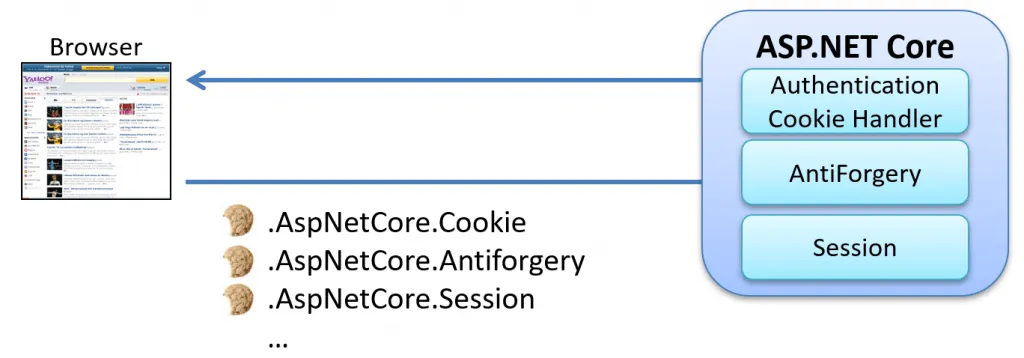
Protecting The ASP.NET Core Cookies
The content of these cookies is protected through a combination of encryption and signing mechanisms. These protective measures ensure the confidentiality and integrity of the information stored within the cookies.
The protection is managed by the Data Protection API (DPAPI) as shown below:
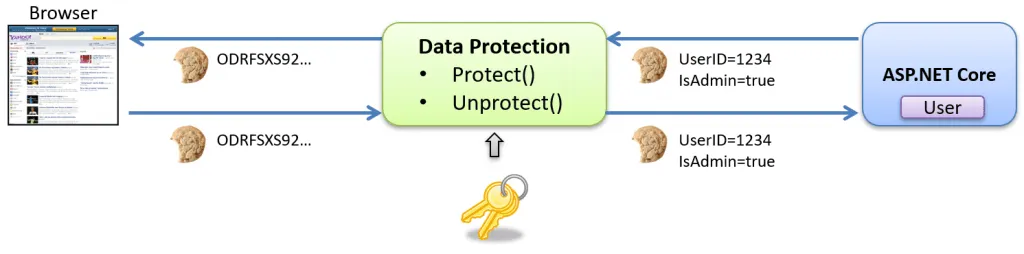
The Data Protection API in ASP.NET Core is a framework for securing sensitive data, managing encryption, and facilitating key rotation. It offers a unified interface for encryption, decryption, and signing that enhances application data security. How the Data Protection API works is beyond the scope of this blog post.
The ASP.NET Core Authentication Cookie
The Authentication Cookie in ASP.NET Core maintains user authentication across HTTP requests. When a user logs in, the authentication system typically issues a cookie to the client, appearing as follows:
Set-Cookie: .AspNetCore.cookie=CfDJ8MSO_2XEvwalH...;
expires=Thu, 30 Nov 2023 09:38:16 GMT; path=/; secure; samesite=lax; httponly
The Data Protection API encrypts this cookie, making its contents inaccessible and tamperproof.
So, how can we peek inside this cookie?
Luckily for us, we can turn off this protection by providing a custom transparent data protector, as shown below:
public class MyDataProtector : IDataProtector
{
    public IDataProtector CreateProtector(string purpose)
    {
        return new MyDataProtector();
    }

    public byte[] Protect(byte[] plaintext)
    {
        return plaintext;
    }

    public byte[] Unprotect(byte[] protectedData)
    {
        return protectedData;
    }
}
We can then add this protector to the authentication cookie handler:
builder.Services.AddAuthentication("cookie")
.AddCookie("cookie", o =>
{
    o.DataProtectionProvider = new MyDataProtector();
});
This means that the issued cookies will not be protected at all. To test this and issue a new unsecured cookie, we first need to sign in a user. Wecan do this by using this simple test code:
app.MapGet("/login", async context =>
{
    var claims = new Claim[]
    {
        //Standard claims
        new Claim(ClaimTypes.Name, "Tore Nestenius"),
        new Claim(ClaimTypes.Country, "Sweden"),
        new Claim(ClaimTypes.Email, "tore@tn-data.se"),

        //Custom claims
        new Claim("JobTitle", "Consultant and trainer"),
        new Claim("JobLevel", "Senior"),
        new Claim("webpage", "https://www.tn-data.se"),
    };

    var identity = new ClaimsIdentity(claims: claims,
                                      authenticationType: "cookie");

    var user = new ClaimsPrincipal(identity: identity);

    var authProperties = new AuthenticationProperties
    {
    };

    //Sign-in the user
    await context.SignInAsync("cookie", user, authProperties);

    await context.Response.WriteAsync("<!DOCTYPE html><body>");
    await context.Response.WriteAsync("Logged in!");
});
In the code above, we create a ClaimsPrincipal user object and ask the cookie handler to sign this user. By doing so, the handler will issue a new unprotected authentication cookie.
Running this code will issue a new cookie that can look like this:
Set-Cookie:  .AspNetCore.cookie=BQAAAAZjb29raWUBAAAABmNvb2tpZQEAAQAGAAAAAQAOVG9yZSBOZXN0
ZW5pdXMBAAEA AQAAAAAAPWh0dHA6Ly9zY2hlbWFzLnhtbHNvYXAub3JnL3dzLzIwMDUvMDUvaWRlbnRpdHkvY2x
haW1zL2NvdW50 cnkGU3dlZGVuAQABAAEAAAAAAEJodHRwOi8vc2NoZW1hcy54bWxzb2FwLm9yZy93cy8yMDA1Lz
A1L2lkZW50aXR5L2 NsYWltcy9lbWFpbGFkZHJlc3MPdG9yZUB0bi1kYXRhLnNlAQABAAEAAAAAAAhKb2JUaXRsZ
RZDb25zdWx0YW50IGFuZ CB0cmFpbmVyAQABAAEAAAAAAAhKb2JMZXZlbAZTZW5pb3IBAAEAAQAAAAAAB3dlYnBh
Z2UWaHR0cHM6Ly93d3c udG4tZGF0YS5zZQEAAQABAAAAAAAAAAEAAAADAAAACy5wZXJzaXN0ZW50AAcuaXNzdWV
kHVRodSwgMTYgTm92 IDIwMjMgMDk6NTc6MDQgR01UCC5leHBpcmVzHVRodSwgMzAgTm92IDIwMjMgMDk6NTc6MD
QgR01U; expires=Thu, 30 Nov 2023 09:57:04 GMT; path=/; secure; samesite=lax; httponly
To peek inside the cookie, we need to first base64 decode it. We can do that using a tool like Base64Decode, and if we do that, we will see the following:
......cookie.....cookie...........Tore Nestenius..........=
http://schemas.xmlsoap.org/ws/2005/05/identity/claims/country.Sweden..........B
http://schemas.xmlsoap.org/ws/2005/05/identity/claims/emailaddress.tore@tn-data.se
...........JobTitle.Consultant and trainer...........JobLevel.Senior...........
webpage.https://www.tn-data.se......................persistent...issued.
Thu, 16 Nov 2023 09:57:04 GMT..expires.Thu, 30 Nov 2023 09:57:04 GMT
(The non-printable characters have been replaced with a dot).
This shows that inside the cookie we find the entire authentication ticket (consisting of the ClaimsPrincipal and the AuthenticationProperties).
The ASP.Net Core Session Cookie
The session service in ASP.NET Core is a mechanism for managing user-specific data across requests, often being used for scenarios like maintaining a shopping cart. This service issues a protected cookie to the browser to keep track of the data. It is important to know that this cookie and its purpose are unrelated to the earlier authentication cookie.
Your application can ask the session service to remember temporary data for the current user, as shown below:
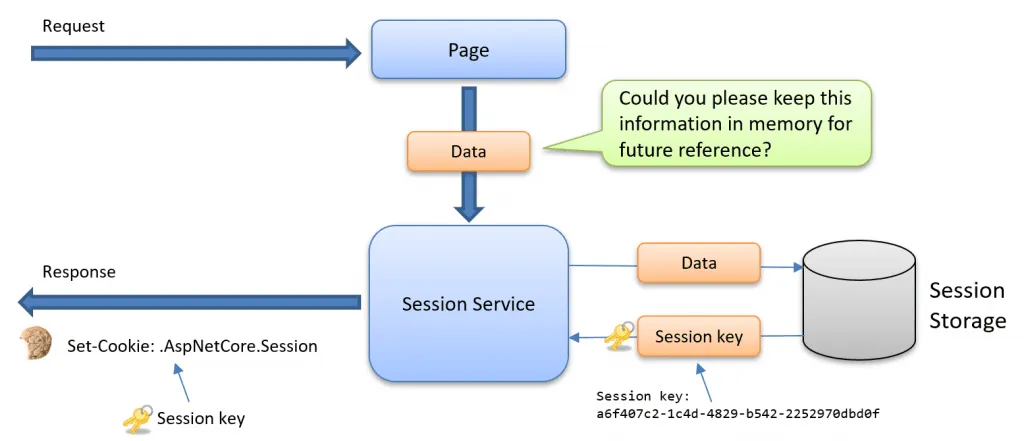
To implement the session service, register the service and add it to the request pipeline:
// Register the service
builder.Services.AddSession(options =>
{
    //...Options…
});

//..
app.UseSession();
A sample session cookie could look like:
Set-Cookie:
.AspNetCore.Session=CfDJ8MSO%2F2XEvalHlF%2Fgv69RLqD6mFWeTVC1MG3dYxNWftq625VyGyqF%2BeIq2
xaqgm1cd4McTp0ydSLcRYraIA4%2F%2Bn89FKFhz567AcC%2FeSnwabg4eRrlFAeWLFBq0K8zl2ISdMPcY0pj%
2BtAJQgC5NIte76QR4TlheM1ZhsD98WAdAvKM; path=/; samesite=lax; httponly
This cookie is also protected using the Data Protection API; however, there is no way to provide a custom transparent data protector, as we did in the previous example.
Peeking inside the Session Cookie?
One option is to download and modify the code for the session middleware. The source code is found on GitHub, and it is straightforward to modify. When I introduce the transparent protector, the unencrypted cookie will look like this:
Set-Cookie: .AspNetCore.Session=Y2M1NGVjZGItZDhjNi0yYTI1LTM2N2UtMjhhNmM4ZWRhMzMw;
path=/; samesite=lax; httponly
This cookie is also base64 encoded, so decoding the cookie will result in the following data:
cc54ecdb-d8c6-2a25-367e-28a6c8eda330This GUID acts as a session key used to look up the session object for the current request. Where the data is stored depends on how you have configured the session system.
The session system in ASP.NET Core provides various storage options, including in-memory storage, distributed cache, and external storage providers, which allowsdevelopers to choose the most suitable method for their application’s scalability and performance needs.
Upskill With Me: Courses, Workshops & Training
 Want to sharpen your skills and make the most of your professional development program? I offer a range of workshop courses and coaching services for individuals and teams! Click the links or the button to find out more. If you have any questions, I’m happy to help! Find Out More
The ASP.NET Core Antiforgery Cookie
This cookie is crucial forsafeguarding against Cross-site Request Forgery (CSRF) attacks. This cookie operates on a token-based system, where the token is stored within the cookie and also embedded in HTML forms. When a form is submitted, the token in the form data must correspond with the token in the cookie to ensure security.
Additionally, the Data Protection API secures this cookie. The implementation of this protection is handled by the DefaultAntiforgeryTokenSerializer class, which you can explore in detail here .
Here’s an example of how this cookie can beset in ASP.NET Core:
Set-Cookie: .AspNetCore.Antiforgery.YCD23e8AirM=CfDJ8MSO_2XEvalHlF_gv69RLqDarftldkzWvbxvac
LnZ4WtaTDcgSCPmxQdmK8OHbGfMIUvV0VhcFkx4Ys8jPppklGBUGWRTsXcwxhMBl7nqZA0s_xYN5jJq3J7
LrH8EikY82bOYmSoA_wEYCxkcrBEEAs; path=/; samesite=strict; httponly


While this blog post does not go into the specifics of the token's internal structure, those interested in this
can refer to the Default [Antiforgery Token Serializer](https://github.com/dotnet/aspnetcore/blob/main/src/Antiforgery/src/Internal/DefaultAntiforgeryTokenSerializer.cs)
class for an in-depth understanding of how the token is constructed.

## Conclusions

This post covers ASP.NET Core cookies, specifically the authentication, session, and antiforgery cookies,
shedding light on their contents. It emphasizes the security aspects involving encryption and signing through the Data Protection API.

- **The authentication cookie**
    This cookie contains the entire ClaimsPrincipal user object and the associated authentication properties.
- **The antiforgery cookie**
    The token of this cookie is used to protect HTML forms.
- **The session cookie**
    This cookie contains the session key that the session service can use to look up the stored data for a given user.

Remember that you should never disable data protection in real production applications!

## Resources

- [How to: Use Data Protection](https://learn.microsoft.com/en-us/dotnet/standard/security/how-to-use-data-protection)
- [Configure ASP.NET Core Data Protection](https://learn.microsoft.com/en-us/aspnet/core/security/data-protection/configuration/overview)
- [Storing the ASP.NET Core Data Protection Key Ring in Azure Key Vault](https://www.edument.se/post/storing-the-asp-net-core-data-protection-key-ring-in-azure-key-vault?lang=en)
- [Use cookie authentication without ASP.NET Core Identity](https://learn.microsoft.com/en-us/aspnet/core/security/authentication/cookie)

## More posts by the author

- [Persisting the ASP.NET Core Data Protection Key Ring in Azure Key Vault](/net/persisting-the-asp-net-core-data-protection-key-ring-in-azure-key-vault/)
- [BearerToken: The new Authentication handler in .NET 8](/net/bearertoken-the-new-authentication-handler-in-net-8/)
- [Debugging JwtBearer Claim Problems in ASP.NET Core](/net/debugging-jwtbearer-claim-problems-in-asp-net-core/)
- [Debugging OpenID Connect Claim Problems in ASP.NET Core](/net/missing-openid-connect-claims-in-asp-net-core/)
- [Introducing the Cloud Debugger for Azure](/azure/introducing-the-cloud-debugger-for-azure/)

## Related Training Workshops

- [Building ASP.NET Core APIs](https://tn-data.se/courses/building-asp-net-core-apis/)
- [ASP.NET Core fundamentals](https://tn-data.se/courses/asp-net-core-fundamentals/)
- [Web security fundamentals](https://tn-data.se/courses/web-security-fundamentals/)

## Feedback, comments, found any bugs?

Let me know if you have any feedback, anything I missed, or any bugs/typos. You can find my contact details [here](/contact/).