BearerToken: The new Authentication handler in ASP.NET Core 8
Microsoft introduced the new BearerToken authentication handler in ASP.NET Core 8 as part of an initiative to streamline and modernize authentication processes. This blog post dives into how the BearerToken in ASP.NET Core handler works, its key features, and how it differs from existing authentication handlers like Cookie and JwtBearer.
Head over to the blog post Improvements to auth and identity in ASP.NET Core 8 to read more about their effort to improve ASP.NET Core authentication.
Background
In the past, after you authenticated as a user, your application typically issues a session cookie. This cookie contains your user identity in the form of a ClaimsPrincipal. The content of the cookie is protected and encrypted using the built-in Data Protection API.
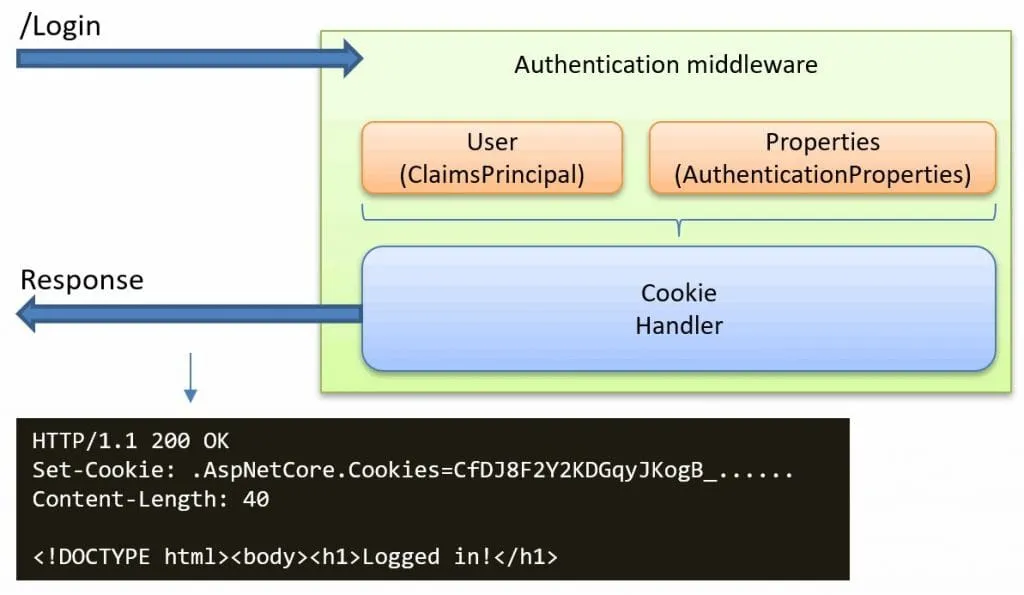
The issuer of this cookie is the Cookie authentication handler. This handler has two main purposes:
- When a user has been authenticated, the handler issues a new session cookie based on the provided user details, as shown in the picture below:
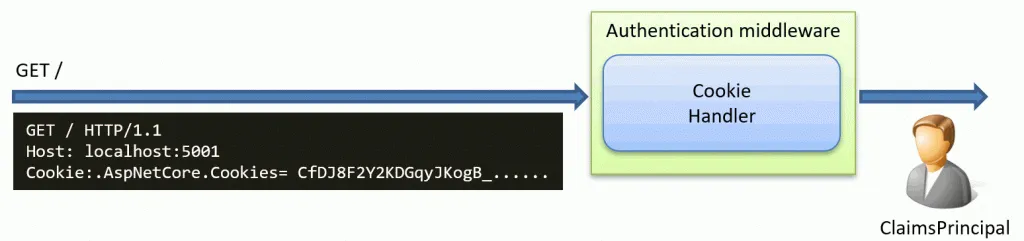
- Authenticating all incoming requests by looking for a session cookie. If a valid cookie is found, it will create a ClaimsPrincipal user object based on the information inside the cookie. This user object is then passed along the request pipeline in ASP.NET Core.
Why do we need a new authentication handler?
Today, systems typically rely on the session cookie to authenticate user requests. This means that you are usually forced to use the user interface as provided by the backend server, with few options for customization. This often results in an inconsistent experience for users when they transition from a browser-based app experience to a server-rendered one.
Some of the goals by Microsoft are:
- Improve Cookie-Based Authentication: Introduce more customization and consistent user experience between single-page and server-rendered apps.
- Introduce Token-Based Authentication: Shift from cookies to the more flexible and widely-used, token-based authentication system.
The BearerToken handler is a core component of this effort.
What does the BearerToken handler in ASP.NET Core do?
The new BearerToken handler can be seen as an alternative to the cookie handler, but with a twist..
Instead of issuing cookies, it will issue an access and refresh token. These tokens are not JWT tokens (for accessing external APIs). Instead, they are meant to be used between the client and web applications.
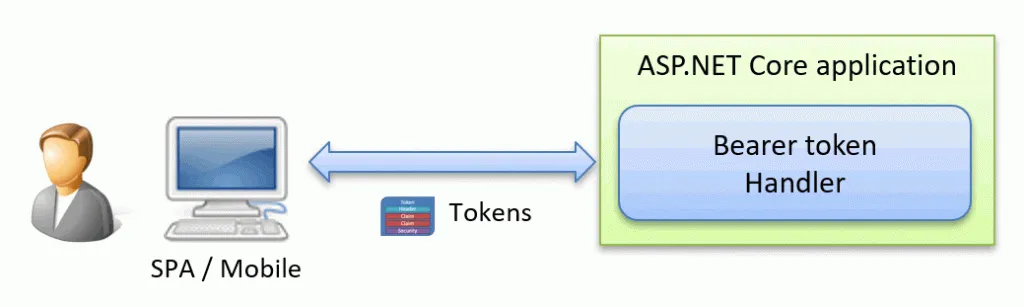
The BearerToken handler is not meant to be a stand-alone component. Instead, it is meant to be used with the ASP.NET Core Identity or a similar library.
Sample ASP.NET Core BearerToken Application
I created a tiny sample application that shows the BearerToken handler in action. You can find the source code on GitHub
Running the Sample Application Do the following steps to use the application:
- Start a web client, like Postman.
- Start the application and click on the Login link.
- As a result, you will be presented with the access and refresh token in JSON.
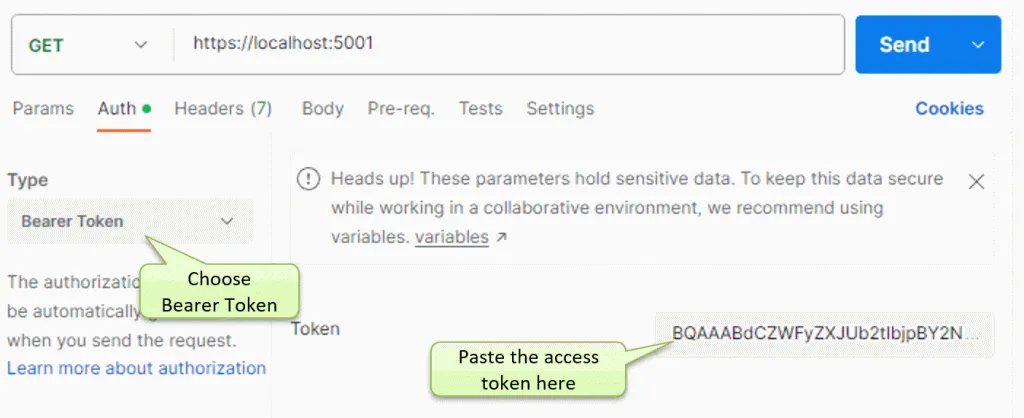
- In Postman:
- Make a GET request to the site homepage at
https://localhost:5001 - Choose Auth -> Bearer Token
- Copy/paste the access token from the page.
- Make a GET request to the site homepage at
- Press Send to send the request to the site
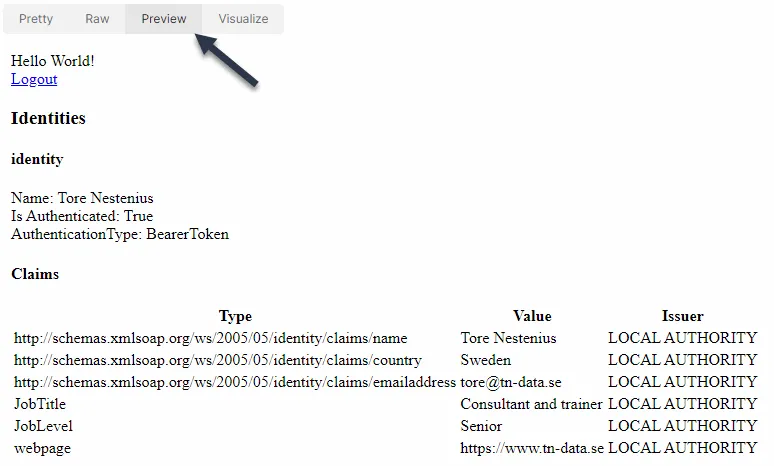
As a result, you should get an HTML page back. Click on the Preview tab to view the page in Postman, as shown below. On the page, you will see the claims extracted from the access token you sent to the application.
Why can’t I run this directly in the browser?
The BearerToken handler is meant for clients who prefer to do authentication programmatically instead of going through the usual UI pages. That is why you must use tools like Postman so that you can get the token to be included in the authorization header.
Feel free to replace the BearerToken handler with the cookie handler in the source code. If you do, it will work as a normal web application using a session cookie.
What’s inside the tokens provided by the BearerToken handler?
We saw that the result of a sign-in is this JSON document:
{
  "token_type": "Bearer",
  "access_token": "CfDJ8F2Y2KDGq...",
  "expires_in": 3600,
  "refresh_token": "CfDJ8F2Y2KDG..."
}
What’s inside the access token? Can we look inside it?
By default, it is encrypted using the Data Protection API, but with a little code, we can make a transparent data protector that will not perform any encryption. This allows us to peek inside the tokens.
To do this, we can implement a custom transparent IDataProtector:
public class MyDataProtector : IDataProtector
{
    public IDataProtector CreateProtector(string purpose)
    {
        return new MyDataProtector();
    }

    public byte[] Protect(byte[] plaintext)
    {
        return plaintext;
    }

    public byte[] Unprotect(byte[] protectedData)
    {
        return protectedData;
    }
}
Then, we configure the BearerToken handler to use this custom protector instead:
.AddBearerToken(o =>
{
    o.BearerTokenProtector = new TicketDataFormat(
                                    new MyDataProtector()
                                        .CreateProtector(""));
    o.RefreshTokenProtector = new TicketDataFormat(
                                    new MyDataProtector()
                                        .CreateProtector(""));
});
Now, when we sign-in again, we get the same JSON structure as before:
{
  "token_type": "Bearer",
  "access_token": "BQAAABdCZWFyZXJUb2tlbjpBY2Nlc3NUb2tlbgEAAAALQmVhcmVyVG9rZW4BAAEABgAAAAEADl
RvcmUgTmVzdGVuaXVzAQABAAEAAAAAAD1odHRwOi8vc2NoZW1hcy54bWxzb2FwLm9yZy93cy8yMDA1LzA1L2lkZW50aXR
5L2NsYWltcy9jb3VudHJ5BlN3ZWRlbgEAAQABAAAAAABCaHR0cDovL3NjaGVtYXMueG1sc29hcC5vcmcvd3MvMjAwNS8w
NS9pZGVudGl0eS9jbGFpbXMvZW1haWxhZGRyZXNzD3RvcmVAdG4tZGF0YS5zZQEAAQABAAAAAAAISm9iVGl0bGUWQ29uc
3VsdGFudCBhbmQgdHJhaW5lcgEAAQABAAAAAAAISm9iTGV2ZWwGU2VuaW9yAQABAAEAAAAAAAd3ZWJwYWdlFmh0dHBzOi
8vd3d3LnRuLWRhdGEuc2UBAAEAAQAAAAAAAAABAAAAAgAAAAsucGVyc2lzdGVudAAILmV4cGlyZXMdTW9uLCAyMSBBdWc
gMjAyMyAxNDo1MTozOSBHTVQ",
  "expires_in": 3600,
  "refresh_token": "BQAAABhCZWFyZXJUb2tlbjpSZWZyZXNoVG9rZW4BAAAAC0JlYXJlclRva2VuAQABAAYAAAABA
  A5Ub3JlIE5lc3Rlbml1cwEAAQABAAAAAAA9aHR0cDovL3NjaGVtYXMueG1sc29hcC5vcmcvd3MvMjAwNS8wNS9pZGVu
  dGl0eS9jbGFpbXMvY291bnRyeQZTd2VkZW4BAAEAAQAAAAAAQmh0dHA6Ly9zY2hlbWFzLnhtbHNvYXAub3JnL3dzLzI
  wMDUvMDUvaWRlbnRpdHkvY2xhaW1zL2VtYWlsYWRkcmVzcw90b3JlQHRuLWRhdGEuc2UBAAEAAQAAAAAACEpvYlRpdG
  xlFkNvbnN1bHRhbnQgYW5kIHRyYWluZXIBAAEAAQAAAAAACEpvYkxldmVsBlNlbmlvcgEAAQABAAAAAAAHd2VicGFnZ
  RZodHRwczovL3d3dy50bi1kYXRhLnNlAQABAAEAAAAAAAAAAQAAAAEAAAAILmV4cGlyZXMdTW9uLCAwNCBTZXAgMjAy
  MyAxMzo1MTozOSBHTVQ"
}
The tokens are still a bit scrambled, so this didn’t help us that much!
However, what is the first thing you check when you have a string of random characters? You check if it is base64 encoded, and there are plenty of online tools to do that. One is https://www.base64decode.org
If we do that, we can see the data stored inside the access token:
.....BearerToken:AccessToken.....BearerToken...........Tore Nestenius..........=
http://schemas.xmlsoap.org/ws/2005/05/identity/claims/country.Sweden..........B
http://schemas.xmlsoap.org/ws/2005/05/identity/claims/emailaddress.tore@tn-data.se...........
JobTitle.Consultant and trainer...........JobLevel.Senior...........
webpage.https://www.tn-data.se......................persistent...expires.Mon, 21 Aug 2023 14:51:39 GMT
(Replaced all non-ASCII characters with a .)
What is inside the BearerToken refresh token?
If you base64 decode the refresh token, you will find:
.....BearerToken:RefreshToken.....BearerToken...........Tore Nestenius..........=
http://schemas.xmlsoap.org/ws/2005/05/identity/claims/country.Sweden..........B
http://schemas.xmlsoap.org/ws/2005/05/identity/claims/emailaddress.tore@tn-data.se...........
JobTitle.Consultant and trainer...........JobLevel.Senior...........
webpage.https://www.tn-data.se......................expires.Mon, 04 Sep 2023 13:51:39 GMT
Comparing the two tokens, you will see they contain the same user information except for the token type and expiration time (Highlighted in bold above). The expiration time can be customized in the BearerToken options.
What is the purpose of the refresh token?
As we see above, the refresh token contains the same user information as the access token. One observation when reviewing the source code for the BearerHandler is that it only issues refresh tokens, but it does not contain any code to handle them. Instead, this token is meant to be consumed by another library (like ASP.NET Core Identity). For more details, see this GitHub issue:
Add token refresh endpoints to identity
Another observation is that these tokens are not JWT-tokens, which are usually a common format to transfer user information between systems.
Comparing the BearerToken, Cookie, and JwtBearer Handlers
In ASP.NET Core, we now have three handlers that do almost the same thing. The picture below tries to summarize the differences: 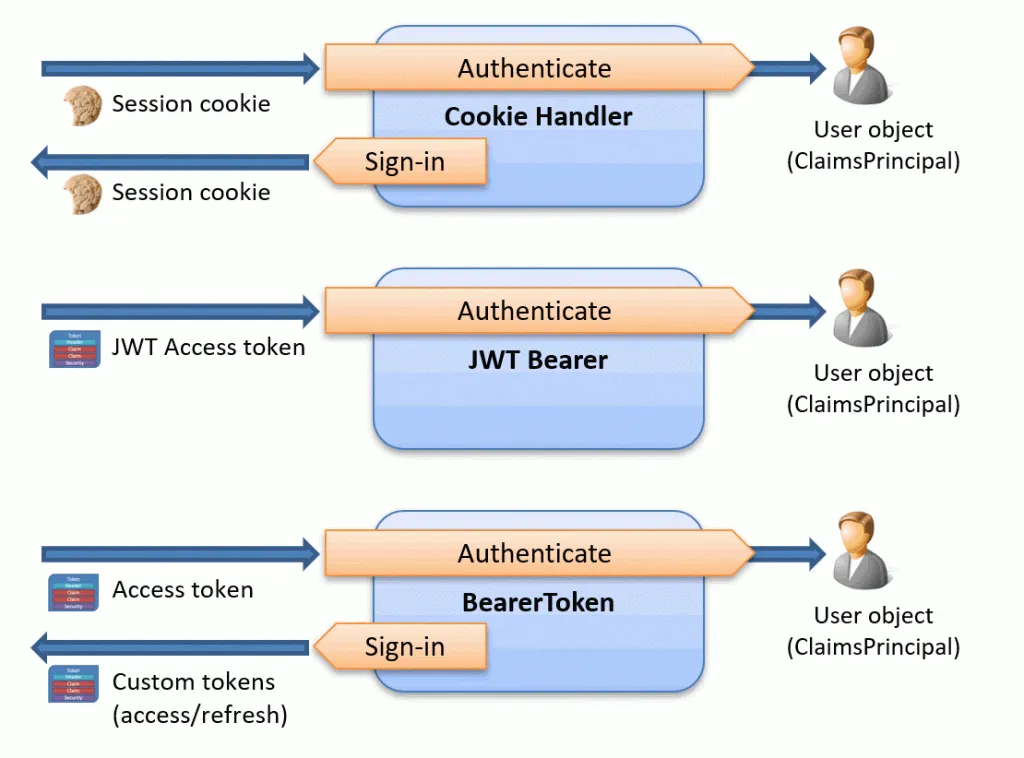
All three aim to authenticate user requests, while two of them also handle user sign-in information.
What about security? From a security perspective, I have mixed feelings about issuing and storing tokens in the client and if this can be done securely. As we all know, public clients (like mobile and browser-based apps) can’t handle secrets. However, this is all new for us as .NET developers, so we must see what patterns will emerge. Personally, I would probably introduce some BFF-style proxy between the client and server, as excellently explained in these two videos:
- alert‘OAuth 2 0’; // The impact of XSS on OAuth 2 0 in SPAs
- Securing SPAs and Blazor Applications using the BFF (Backend for Frontend) Pattern - Dominick Baier
Issues with the BearerToken handler in ASP.NET Core
Working on this blog post has also raised a few questions, including:
- Token size: The tokens can get quite large when they are filled with user claims, and there is no option to add a SessionStore(ITicketStore) like we can when we use the Cookie handler.
- No way to customize the content of the refresh token: I am a bit curious why the content of it is the same as in the access token. I would assume we need less information in the refresh token.
Conclusions
I hope you now better understand the purpose of the new BearerToken handler in ASP.NET Core, how it works, and its limitations. This handler is part of ASP.NET Identity, so it will be interesting to see how this all turns out. However, that is a subject for another blog post.
What is new in ASP.NET Core 9?
ASP.NET Core 9 introduces two significant features aimed at enhancing support for OpenID Connect: Pushed Authorization Requests (PAR) and the AdditionalAuthorizationParameters option. PAR helps improve security and performance by allowing confidential clients to initiate authorization requests directly with the authorization server. The AdditionalAuthorizationParameters option provides flexibility for developers, enabling custom parameters to be passed during authorization. Both features are crucial for developers working with advanced OpenID Connect scenarios. To dive deeper into PAR, check out my blog post: Pushed Authorization Requests (PAR) in ASP.NET Core 9.
Resources
- Improvements to auth and identity in ASP.NET Core 8
- Auth improvements in ASP.NET Core 8
- Microsoft.AspNetCore.Authentication.BearerToken
- BearerToken source code
- Add token refresh endpoints to identity
- MapIdentityApi HTTP endpoints
- Add API endpoints for generating identity tokens
- ASP.NET Core SPA Templates Need Better Options for Authentication code
More posts by the author
- Debugging OpenID Connect claim problems in ASP.NET Core
- IdentityServer – IdentityResource vs. ApiResource vs. ApiScope
- Troubleshooting JwtBearer authentication problems in ASP.NET Core
- Debugging cookie problems in ASP.NET Core
- Pushed Authorization Requests (PAR) in ASP.NET Core 9
- Configuring ASP.NET Core Forwarded Headers Middleware